Technical Documentation
Introduction: Your Business Engine in the Cloud
Welcome to OrbitNova, the cloud hosting backbone designed to power your business applications with unwavering reliability and intelligence. At OdooInfinity, we understand that your digital infrastructure is the nerve center of your operations. OrbitNova isn't just a hosting service—it's a strategic partnership that transforms how you deploy, manage, and scale your business ecosystem.
Our platform emerged from a simple observation: businesses need hosting that adapts to them, not the other way around. Whether you're running a resource-intensive Odoo deployment, managing complex databases, or orchestrating multi-application workflows, OrbitNova provides the foundation you need to operate with confidence.
Platform Architecture & Core Capabilities
Infrastructure Foundation
OrbitNova operates on a distributed infrastructure architecture that emphasizes both power and resilience.
Multi-Layered Redundancy
Every critical component—from storage arrays to network pathways—includes backup systems that activate automatically should primary systems encounter issues.
Resource Isolation
Your applications run in isolated containers, preventing resource contention and ensuring consistent performance regardless of neighboring activity.
Geographic Distribution
Infrastructure spanning multiple geographic zones allows you to deploy closer to your user base for reduced latency.
Always-On Monitoring
Real-time infrastructure monitoring with automated alerting ensures your team is always informed before issues reach users.
Management & Control Layer
Complete command over your environment without unnecessary complexity.
- Unified Control Panel: A single dashboard consolidates all management functions—server monitoring, resource allocation, application deployment, and system diagnostics.
- API-First Design: Every action available through our interface is also accessible via RESTful APIs, enabling automation and integration with your existing DevOps toolchains.
- Activity Auditing: Comprehensive logging captures every system interaction, providing full visibility into who accessed what and when.
Database Engineering
Understanding that database performance often determines application responsiveness, we've engineered our database layer for excellence.
- Query Optimization Engine: Our platform actively analyzes database queries and suggests indexing strategies to improve execution times.
- Connection Pooling: Intelligent connection management reduces overhead during peak usage periods.
- Automated Vacuuming: Database maintenance occurs during low-activity windows to prevent performance degradation without manual intervention.
Distinguishing Advantages
True Business Continuity
OrbitNova goes beyond traditional backup solutions. Our approach to business continuity encompasses:
- Application-Aware Backups: We understand the structure of business applications, ensuring backups capture complete application states rather than just raw data.
- Restore Testing: Backup integrity is verified through automated restore tests, confirming your ability to recover when it matters most.
- Failover Orchestration: Automated failover processes redirect traffic to healthy nodes with minimal disruption to end-users.
Intelligent Resource Management
Our platform actively manages resources to optimize both performance and cost:
- Predictive Scaling: Using historical usage patterns, OrbitNova anticipates resource needs and provisions capacity before demand spikes occur.
- Right-Sizing Recommendations: We analyze your actual resource consumption and suggest optimizations to eliminate waste while maintaining performance margins.
- Burst Capacity: For unpredictable workloads, we provide temporary resource expansion capabilities that activate only when needed.
Security-First Architecture
Security isn't an add-on at OrbitNova—it's woven into our architecture:
Defense in Depth
Multiple security layers protect your data, including network segmentation, application firewalls, and intrusion detection systems.
Compliance Framework
Infrastructure adhering to industry standards for data protection, providing assurance needed for regulated industries.
Encryption Everywhere
Data is encrypted both at rest and in transit, with key management practices that maintain control with you.
Continuous Monitoring
24/7 security event monitoring with automated threat response keeps your environment protected around the clock.
Developer-Friendly Environment
We've designed OrbitNova to be a joy for development teams:
- Environment Cloning: Spin up identical staging environments with a single click, eliminating environment drift between development and production.
- Integrated CI/CD: Seamless connections to popular deployment pipelines reduce friction in your release process.
- Custom Runtime Configurations: Advanced users can fine-tune environment parameters to match specific application requirements.
Instance Creation
Creating a new instance in OrbitNova is a streamlined process designed to get your environment up and running within minutes. An instance represents a complete hosting environment with dedicated resources, isolated networking, and your choice of application stack.
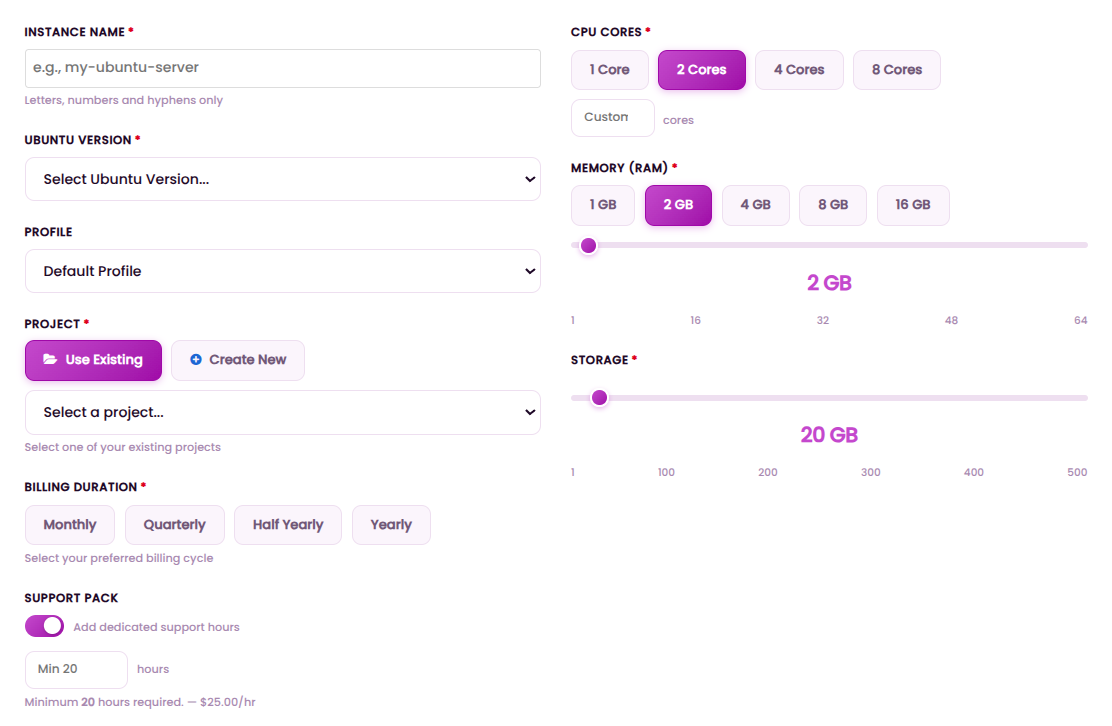
Figure 1: Instance Creation Form - Configure your instance specifications, resources, and billing preferences
Instance Configuration Options
- Instance Name: Enter a unique identifier for your instance. Only letters, numbers, and hyphens are allowed (e.g., my-ubuntu-server).
- Ubuntu Version: Select from available Ubuntu LTS versions for your operating system.
- Profile: Choose from pre-configured profiles or use the default profile for standard configuration.
- Project Assignment: Associate your instance with an existing project or create a new project during instance creation.
- Billing Duration: Select your preferred billing cycle—Monthly, Quarterly, Half Yearly, or Yearly—to optimize costs.
- Support Pack: Add dedicated support hours (minimum 20 hours required at $25.00/hour) for premium technical assistance.
- CPU Cores: Choose from 1, 2, 4, or 8 cores, or specify a custom number based on your workload requirements.
- Memory (RAM): Select from 1GB, 2GB, 4GB, 8GB, or 16GB options to match your application needs.
- Storage: Configure your storage capacity using the slider controls for optimal disk space allocation.
Step-by-Step Instance Creation
Access the Instance Dashboard
Navigate to the OrbitNova control panel and select "Create New Instance" from the main dashboard. You'll be presented with configuration options to begin the setup.
Configure Instance Specifications
Enter your instance name, select the Ubuntu version, choose a profile, and assign the instance to a project. Configure your billing preferences and add support hours if needed.
Allocate Resources
Select your CPU core count, memory (RAM) capacity, and storage size. The interface provides real-time cost estimates based on your selections.
Review and Deploy
Review all configuration options, confirm your billing preferences, and click "Create Instance." Your instance will begin provisioning immediately with real-time progress updates.
Project Creation
Projects in OrbitNova provide organizational structure for your instances and resources. A project acts as a container for related deployments, allowing teams to collaborate efficiently while maintaining clear isolation between different environments and applications.
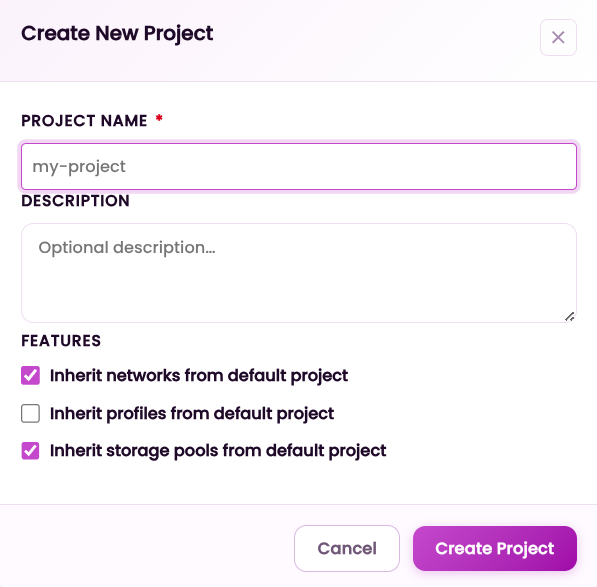
Figure 2: Create New Project Form - Configure your project details and inheritance options
Project Management Features
- Project Name: Provide a descriptive name for your project that clearly identifies its purpose.
- Description: Add optional details to help team members understand the project's scope and objectives.
- Inherit Networks from Default Project: Enable this option to automatically inherit network configurations from the default project.
- Inherit Profiles from Default Project: Choose to inherit pre-configured profiles from the default project for consistent configurations.
- Inherit Storage Pools from Default Project: Leverage existing storage pool configurations to simplify setup.
Step-by-Step Project Creation
Navigate to Project Dashboard
From the OrbitNova main menu, select "Projects" and click the "Create New Project" button located in the upper-right corner of the dashboard.
Define Project Details
Enter a descriptive project name and optional description. This helps team members quickly understand the project's purpose.
Configure Inheritance Options
Choose which resources to inherit from the default project—networks, profiles, and storage pools. This streamlines setup and ensures consistency across projects.
Create Project
Review all configuration options and click "Create Project." Your project will be created immediately and ready for instance deployments.
Industry-Specific Optimization
OrbitNova recognizes that different industries have unique operational rhythms and requirements. Our platform provides specialized optimizations for various sectors:
Manufacturing
- Scheduled maintenance windows coordinated with production schedules
- Efficient batch processing for large-volume data tasks
- Pre-configured supply chain integration for logistics platforms
Hospitality
- Automatic capacity adjustment for seasonal demand spikes
- Enhanced privacy controls for guest data protection
- Multi-property management tools for distributed operations
Fleet & Logistics
- Infrastructure optimized for real-time GPS and telemetry data streams
- Enhanced compute for route optimization algorithms
- Reliable event processing for delivery confirmations
Getting Started Roadmap
Discovery Consultation
Begin by scheduling a conversation with our solutions team. We'll discuss your current infrastructure, performance requirements, and growth projections to recommend an optimal configuration.
Trial Deployment
Experience OrbitNova firsthand with our commitment-free trial. We'll provision a complete test environment where you can evaluate performance, test integrations, and verify compatibility with your applications.
Migration Planning
Should you decide to proceed, we'll develop a migration strategy that minimizes disruption. Our team assists with data transfer, application reconfiguration, and testing protocols.
Go-Live & Monitoring
Once your environment is ready, we facilitate the transition to production with active monitoring during the initial period. Our team remains engaged to address any questions and fine-tune configurations.
Support & Engagement Model
Expert Guidance
- Implementation Partnership: We work alongside your team during deployment, offering architectural guidance and best practice recommendations.
- Optimization Reviews: Periodic assessments evaluate your environment's performance and identify enhancement opportunities.
- Knowledge Transfer: We document your configuration and provide training resources to empower your internal team.
Communication Channels
- Priority Response Tiers: Different issue severities receive appropriate response time commitments.
- Direct Technical Access: For complex scenarios, you can connect directly with our engineering team.
- Community Knowledge Base: A searchable repository of articles, guides, and troubleshooting resources available 24/7.
Frequently Asked Questions
Continuous Evolution
OrbitNova is not a static product. Our development roadmap reflects emerging technologies, customer needs, and industry trends. We regularly release updates that enhance performance, introduce new capabilities, and strengthen security. Customers receive advance notification of significant changes, with testing environments available to validate compatibility before updates roll to production.
We invite you to join the growing community of businesses that have elevated their operations with OrbitNova. Whether you're managing a growing enterprise or optimizing a specialized industry deployment, our platform provides the foundation you need to focus on your business—not your infrastructure.